Posts mit dem Label TFS werden angezeigt. Alle Posts anzeigen

Dienstag, 4. April 2017

Team Build with Remote Powershell Cross Domain

I ran into a series of issues when trying to establish a release pipeline in TFS where the build agent is located in the company domain whereas the target server is inside a DMZ-domain. I tried to run the "Run Powershell on Remote Machine" from the company domain build agent computer with a target machine located in the DMZ domain. I do not memorize all the errors I got in detail, but they were all around "WinRM, Could not process request, Kerboros, No authentication Server, Host not found".

Basically the problem comes down to open a remote powershell session. So if this succeeds when logged in to the company domain build agent computer and you connect to srv.mydmz.de being the target server in the dmz-domain:

Enter-PSSession 
    -ComputerName "srv.mydmz.de" 
    -Credential mydmz\username

then your build / release Task "Run Powershell on Remote Machine" should succeed as well. This is useful for testing purposes because you do not need to create a release definition upfront and create a release every time you try to get things up and running.

I found the steps to solve my problem in a blog post from Christopher Hunt, but I want to stress out on thing that I got wrong from many other blog posts providing the same solution.

The solution is rather simple. On the build agent computer and on the target DMZ computer run: 

WinRM Quickconfig 

Then, log in to the build agent computer and run this from an elevated command prompt:

Set-Item wsman:\localhost\Client\TrustedHosts -value "srv.mydmz.de" 

This adds the target server located in the DMZ as trusted host on the company domain joined build agent computer. Then the above command to open a remote powershell succeeded for me where it formerly failed. So a release definition like this should work then if the build agent computer is configured as stated above:

Release Definition executing a powershell across domains


So, call me dumb, but here is the thing I always got wrong until now: you have to add the DMZ-Server as trusted host on the company domain joined server, not the other way round.

To me it appeared more logical that the computer being called (the DMZ-server), i. e. where the remote powershell executes stuff, should trust the computer calling it (the company domain joined server). So I repeatedly tried the Set-Item-Command on the DMZ-Server setting the domain joined build agent computer as the trusted host.

Now that my incompetence in this case is revealed, maybe it might save others some time :-)

Dienstag, 3. Dezember 2013

Get all changesets contained in a merge operation

When merging changes from one TFS branch to another, you can select to merge all changes up to a specific Version, or you can perform a chery pick merge. The latter means, that you pick the changesets you want to merge manually, which allows you to pick a not coherent sequence of changesets for merge.

If you want to know, given a changeset number representing a changeset that contains merges, changes from which changesets are included, afaik you need to aks the TFS API. To make life easier for you, here is my solution:


var tfs = new TfsTeamProjectCollection(new Uri("http://yourServer:8080/tfs/DefaultCollection"));
tfs.EnsureAuthenticated();
var versionControl = tfs.GetService<VersionControlServer>();

var changeSet = versionControl.GetChangeset(3894);
var mergeParentChangesets = changeSet.Changes
                                        .SelectMany(c => versionControl.QueryMergeRelationships(c.Item.ServerItem))
                                        .Select(i => i.Version)
                                        .Cast<ChangesetVersionSpec>()
                                        .Select(i => i.ChangesetId)
                                        .Distinct();


Here my changeset number is 3894. I iterate over all the changes in the changeset, asking for the merge relationships of each Change. I have to use SelectMany as QueryMergeRelationships returns an array of VersionSpec instances. Indeed, all these instances are truely ChangesetsVersionSpec objects, hence the cast. The latter object exposes the changeset id that we can collect in a distinct list.

Hope this helps, and happy merging!

Freitag, 13. Juli 2012

A self made agile taskboard for TFS Express

In the early announcements of TFS Express it was stated that it would contain the agile Taskboard, but not the sprint / backlog planning facilities. But neither in the beta release nor in the RC you could see the taskboard.

According to a tweet from Buck Hodges the taskboard will not be included into TFS Express as a tradoff for being free. While this is sad, because the taskboard was great, I understand that it is needed to cut out some features in the free version - and the features left are still a great deal!

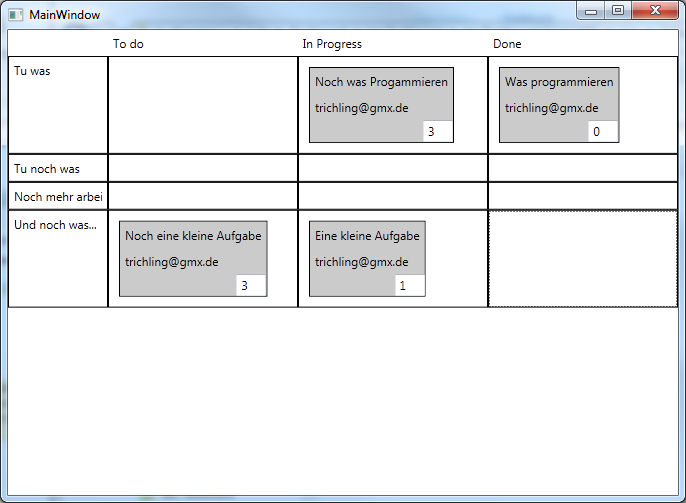
But because the taskboard is great, and because I thought it could not be that hard, I started to write my own. Currently it is a WPF application and not a website, because I am more familar with WPF than ASP.NET MVC. And after a few hours I had my first prototype working!


It is not as nice as the one from Microsoft and it misses some of the features - but it is a starting point. Here is what it can do for you:

  • Configure your TFS / Team Project / Iteration in a config file (no UI for that)
  • Displays BacklogItems as lines and the according tasks in the states "To Do", "In Progress", "Done"
  • You can enter the remaining effort in the textbox in the lower right corner (save on LostFocus)
  • You can drag from "To Do" -> "In Progress",  "In Progress" -> "Done", "To Do" -> "Done" and "Done" -> "To Do" ("Done" -> "In Progress" is forbidden)
  • If you drag to "Done" it sets the effort to 0
Here are the limitations:
  • If you enter wrong TFS Url / Team Project / Iteration the app will crash
  • All operations are synchronous, so you have a delay at start and on every drag 
  • Can not drag from Done to In Progress due to the fact that there must be a rest duration
  • No validation errors are shown if an operation fail
If you want to try it, feel free to download. I have not battle tested this a lot, so it comes without any warranty, as is etc. Use it at your own risk.

If you like it, or you have any suggestions, let me know. By the time I will also release the source code.

Happy Daily Scrum-ing...

Montag, 4. Juni 2012

Incremental Builds with TFS

A very handy TFS feature is kind of well hidden in the settings. The setting is so "tiny" that I did not find it for a long time. But first things first.

The task: set up a team build that compiles only those assemblies that have been modified since the last build. You can call this an incremental build.

The whole magic is the "Clean Workspace" parameter in the build definitions process tab. Here one can choose how the build handles its workspace. You have three choices:

  1. All: Delete Sources & Binaries, then get all and build all. This is a complete rebuild. This is the default
  2. Outputs: Delete the binaries but keep the sources. Gets only the sources that have changed (incremental get). Recompiles all the sources so you get a full set of binaries.
  3. None: Delete nothing. Gets only the sources that have changed and rebuilds only assemblies that have changed. 

Option three is the one that does the trick. If you trigger a build, than change something and trigger another build, your drop location will hold two folders. You will see all the files in both folders but dont be disappointed. All files are moved to the drop location, but mind the changed date: they are all different.


This way you can figure out easily what has acutally changed. This comes in handy if you want to ship hotfixes that only contain files that have really changed to keep installing the hotfix quick.

Have a nice build ;-)
Tobias.

Donnerstag, 5. Januar 2012

A BranchCreatedEvent and TFS Extensibility

There are many extension and integration points in TFS. A very fine thing is the event system. We can hook into this either by defining a web service that gets called by the TFS - this works fine with WCF. Or we define a server side plugin for the event we are interested in, by implementing a class that implements the ISubscriber interface and deploying this into TFS.

Most documentation found on the web is written for TFS 2010 but as of now everything is running well with my TFS vNetxt installation.

The BranchCreatedEvent
There are a lot of useful events, with TFS vNext the list still got longer compared to version 2010. I wanted to do something, everytime a branch is created, so i was looking for a BranchCreatedEvent. But surprise: there is no such event, neither in TFS 2010 nor in TFS vNext. A suggested solution was to create a service that polls for new branches. I am not happy with this approach, but there seems to be no other way. So I started thinking about where to put my polling service.
One opportunity was to create a long running WCF service. I discarded that, because I was not sure wehter the service would restart once the App Pool was recycled. Another option was to write a custom Windows Service. Regarding this solution I was concerned that I would end up with a new services for each new requirement. So I thougth to implement a plugin based service to have on spot to add new features.

A plugin  based Task Scheduler for TFS  
So I wanted to have a task scheduler that could be extented thorugh plugins. And surprise again, there is already such a thing in TFS, called the TFS Job Agent - the thing that is also responsible for initiating the event processing. So all I had to was to find out how to implement a plugin for this agent.

Implementing a custom TFS Job Agent Job
Information about how to accomplish this was a little harder to find. This one put me on track, and other nice information can be found here.

Here is how the story goes:

Create a new class library solution and add the follwoing references:
  • Microsoft.TeamFoundation.Client [GAC]
  • Microsoft.TeamFoundation.Common [GAC]
  • Microsoft.TeamFoundation.Framework.Server [C:\Program Files\Microsoft Team Foundation Server Dev11\Application Tier\TFSJobAgent\]
Add a class implementing the ITeamFoundationJobExtension interface:

    public class MyFirstJob : ITeamFoundationJobExtension 
    {
        public TeamFoundationJobExecutionResult Run(TeamFoundationRequestContext requestContext, TeamFoundationJobDefinition jobDefinition, DateTime queueTime, out string resultMessage)
        {
            resultMessage = "Successfuly created my first job";
            return TeamFoundationJobExecutionResult.Succeeded;
        }
    }

The following code is needed to register the job and get it executed every 30 seconds:

var tfsConfigServerUri = new Uri(String.Format("http://localhost:8080/tfs"));
var tfsConfigServer = TfsConfigurationServerFactory.GetConfigurationServer(tfsConfigServerUri);
var service = tfsConfigServer.GetService<ITeamFoundationJobService>();

var definition = new TeamFoundationJobDefinition(
                    new Guid("E5B15F37-1B19-4014-B354-B6CA3DA908E7"),
                    "My First Job",
                    "Lab.TFSJob.FirstTry.MyFirstJob",
                    null,
                    TeamFoundationJobEnabledState.Enabled);

var schedule = new TeamFoundationJobSchedule(new DateTime(2012, 1, 5, 9, 0, 0), 30);
definition.Schedule.Add(schedule);
                
service.UpdateJob(definition);

To queue the job initially you can add the following line:

var Result = service.QueueJobNow(definition, false);

The dll must be deployed to the %ProgramFiles%\Microsoft Team Foundation Server Dev11\Application Tier\TFSJobAgent\plugins\ folder. After this the job agent service must be restarted once, otherwise the assembly will not be loaded. You can debug your job by attaching to the TFSJobAgent.exe process on the TFS machine.

Now only some logic to check wether there are new branches between two polls and you are done!

Enjoy!