In the early announcements of TFS Express it was stated that it would contain the agile Taskboard, but not the sprint / backlog planning facilities. But neither in the beta release nor in the RC you could see the taskboard.
According to a tweet from Buck Hodges the taskboard will not be included into TFS Express as a tradoff for being free. While this is sad, because the taskboard was great, I understand that it is needed to cut out some features in the free version - and the features left are still a great deal!
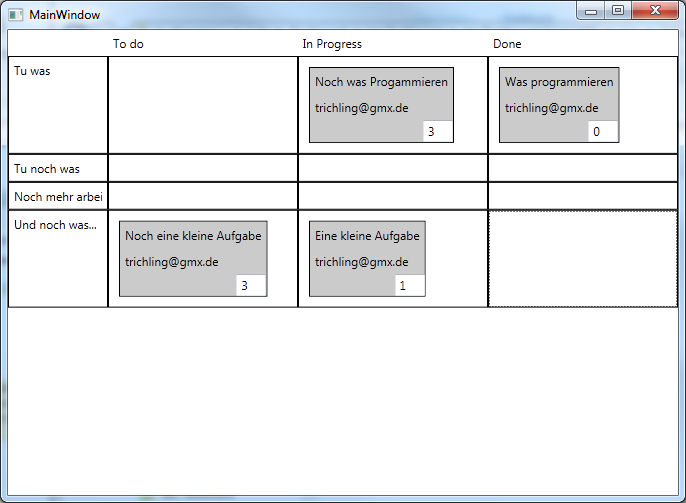
But because the taskboard is great, and because I thought it could not be that hard, I started to write my own. Currently it is a WPF application and not a website, because I am more familar with WPF than ASP.NET MVC. And after a few hours I had my first prototype working!
It is not as nice as the one from Microsoft and it misses some of the features - but it is a starting point. Here is what it can do for you:
- Configure your TFS / Team Project / Iteration in a config file (no UI for that)
- Displays BacklogItems as lines and the according tasks in the states "To Do", "In Progress", "Done"
- You can enter the remaining effort in the textbox in the lower right corner (save on LostFocus)
- You can drag from "To Do" -> "In Progress",
"In Progress" -> "Done", "To Do" -> "Done" and "Done" -> "To Do" ("Done" -> "In Progress" is forbidden)
- If you drag to "Done" it sets the effort to 0
Here are the limitations:
- If you enter wrong TFS Url / Team Project / Iteration the app will crash
- All operations are synchronous, so you have a delay at start and on every drag
- Can not drag from Done to In Progress due to the fact that there must be a rest duration
- No validation errors are shown if an operation fail
If you want to try it, feel free to
download. I have not battle tested this a lot, so it comes without any warranty, as is etc. Use it at your own risk.
If you like it, or you have any suggestions, let me know. By the time I will also release the source code.
Happy Daily Scrum-ing...