Donnerstag, 20. September 2012

HTTP 503 Error in TFS

The night before my TFS Express talk at the BASTA conference I faced an ugly error with my TFS Express installation. The installation ran fine, I could start management console, access the database but trying to access the website at localhost:8080/tfs yielded the 503 error.

As a result of a quick Google query I found out that there is plenty of discussion on the web about this topic, for example at StackOverflow or on MSDN. Some post state that they never found a solution for this, other show a long list of possible things to try - nothing worked for me.

By luck I found the solution to my problem. I used RavenDb on my machine before, which is running on port 8080 as well. Due to a different problem in Raven I had in mind that it does some urlacl-stuff by reserving an urlacl for the URL http://+:8080. This is used to assign rights for accesing this URL for the logged on user. If you face a 503 error when trying to use RavenDb with IIS deployment you should run the following command line:


netsh http delete urlacl http://+:8080/


It seems that running raven from the console does a urlacl reservation, which in turn makes TFS to stop working. The solution to the problem was similar to the solution mentioned on the RavenDb website. Run the above command line and TFS works fine - I assume RavenDb will no longer work properly.

This is neither a RavenDb mistake nor a TFS mistake - you should just configure these servers to run on different ports if they run concurrently.

Anyway this is one possible solutions out of a thousand and perhaps it might save someone some valuable time. Happy serving...


Sonntag, 16. September 2012

Creating a child task for a backlog item with TFS API

Because TFS Express lacks the agile planning tools of the full version, I was writing a small tool that makes creating tasks as children of a backlog item more enjoyable. It took me a while to figure it out, so I share my result.

First you need a reference to the team project collection:

var tfs = new TfsTeamProjectCollection(new Uri("https://your.tfspreview.com"));
tfs.EnsureAuthenticated();

var workItemStore = tfs.GetService<WorkItemStore>();

The the new task work item must be created. To instanciate a work item you must pass its type. You get this from the Project class.

var project = workItemStore.Projects["NameOfYourTeamProject"];
var taskType = project.WorkItemTypes["Task"];
var task = new WorkItem(taskType);
task.Title = "A new task"; 
task.State = "To Do";      
task.Save();

Next, we need to create a parent / child link. We need a WorkItemLinkTypeEnd instance that we can get from the WorkItemLinkType that we can get from the work item store like this:

var linkType = workItemStore.WorkItemLinkTypes["System.LinkTypes.Hierarchy"];
var taskLink = new WorkItemLink(linkType.ReverseEnd, task.Id);

The taskLink instance is a parent / child work item link whose reverse end (where it points to aka the child) points to the id of the task work item we created formerly. To connect the close end to the parent, the backlog item, we have to load it and put the link into its Links collection:

var backlogItem = workItemStore.GetWorkItem(backlogItemId);´
backlogItem.Links.Add(taskLink);
backlogItem.Save();

Thats it - the new task appears as a child of the backlog item (for example in the taskboard). Hope this may save someone some time :-)

Dienstag, 21. August 2012

Portable code between Silverlight, WPF and more

I had some talks about multi-targeting between WPF and Silverlight. The usual approach to achive this was to have one projects for each platform and use file linking to avoid duplicated code. This was working quite well but was a bit of a hassle as well.

With .NET 4.5 Micorsoft gave developers a new tool to solve the problem: portable libraries! There is a new project template called Portable Class Library. If you select it, a dialog box appears asking you which platforms should be targeted:


The selected settings can later be changed using the project properties. The class library can be directly referenced in a Silverlight project as well as in WPF, which was not possible before: an assembly targeted to the .NET Framework could not be referenced from Silverlight.

Some drawbacks...

As every nice feature, this has its drawbacks as well. Of course in the PCL project you can only use a subset of all supported plattforms. On MSDN is a list of supported features. A PCL project can not reference platform specific assemblies - it is limited to other PCL assemblies.
A major thing I miss in contrast to the old school multiple DLL with shared files approach is, that you can no longer use compiler directives to use platform specific code. Neither can you effectivly determine on what platform your code is running. On the one hand that is the idea of PCL, on the other hand it seems like a limitiation to me.

And a conclusion...

I think it all comes down to careful plannig and using the right tool for the right case. I think you can not discard the mulit-assembly approach completely if you want to get most out of mulit targetign. But PCL are a handy way to have real common code - the one that does not need to know the platform it is running on - in a common location. As suggested on MSDN, platform specific code can then be implemented in platform specific assemblies that inherit from your PCL base classes. This yields to a mixed mode between the old and the new approach.

Montag, 30. Juli 2012

VS 2012: Can not show Test Explorer

For quite some time I was working with VS 2012 RC and everything was fine. But all of a sudden I could not open the Test Explorer. I got a MEF error message as shown below:


The main error message was

The composition produces a single composition error. The root cause is provided below. Review the CompositionException.Errors property for more detailed information. 
1) Value cannot be null.
Paramter name: testPlatform
Followed by further error messages. I tried to repair Visual Studio installation, installed different test platform adapters but nothing helped. I found the solution in at Stack Overflow, but very hidden down below, so I repeat it here:

Under C:\Users\Tobias\AppData\Local\Microsoft\VisualStudio\11.0\ComponentModelCache delete the Microsoft.VisualStudio.Default.cache file. That does the trick for me!

Thanks GertGregers and happy testing.

Freitag, 13. Juli 2012

A self made agile taskboard for TFS Express

In the early announcements of TFS Express it was stated that it would contain the agile Taskboard, but not the sprint / backlog planning facilities. But neither in the beta release nor in the RC you could see the taskboard.

According to a tweet from Buck Hodges the taskboard will not be included into TFS Express as a tradoff for being free. While this is sad, because the taskboard was great, I understand that it is needed to cut out some features in the free version - and the features left are still a great deal!

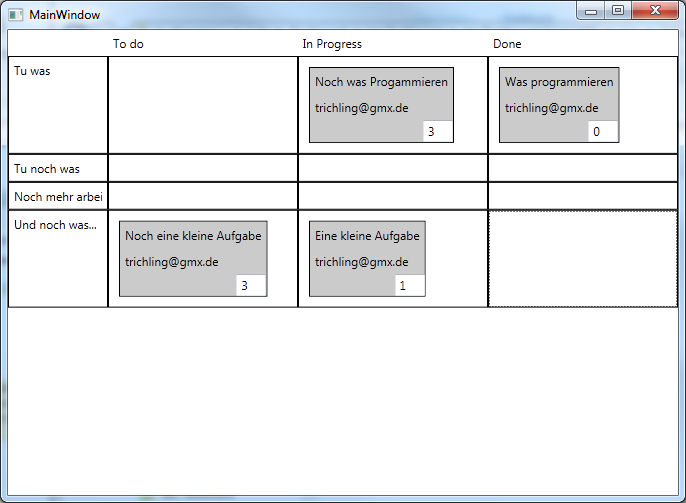
But because the taskboard is great, and because I thought it could not be that hard, I started to write my own. Currently it is a WPF application and not a website, because I am more familar with WPF than ASP.NET MVC. And after a few hours I had my first prototype working!


It is not as nice as the one from Microsoft and it misses some of the features - but it is a starting point. Here is what it can do for you:

  • Configure your TFS / Team Project / Iteration in a config file (no UI for that)
  • Displays BacklogItems as lines and the according tasks in the states "To Do", "In Progress", "Done"
  • You can enter the remaining effort in the textbox in the lower right corner (save on LostFocus)
  • You can drag from "To Do" -> "In Progress",  "In Progress" -> "Done", "To Do" -> "Done" and "Done" -> "To Do" ("Done" -> "In Progress" is forbidden)
  • If you drag to "Done" it sets the effort to 0
Here are the limitations:
  • If you enter wrong TFS Url / Team Project / Iteration the app will crash
  • All operations are synchronous, so you have a delay at start and on every drag 
  • Can not drag from Done to In Progress due to the fact that there must be a rest duration
  • No validation errors are shown if an operation fail
If you want to try it, feel free to download. I have not battle tested this a lot, so it comes without any warranty, as is etc. Use it at your own risk.

If you like it, or you have any suggestions, let me know. By the time I will also release the source code.

Happy Daily Scrum-ing...