Montag, 30. Juli 2012

VS 2012: Can not show Test Explorer

For quite some time I was working with VS 2012 RC and everything was fine. But all of a sudden I could not open the Test Explorer. I got a MEF error message as shown below:


The main error message was

The composition produces a single composition error. The root cause is provided below. Review the CompositionException.Errors property for more detailed information. 
1) Value cannot be null.
Paramter name: testPlatform
Followed by further error messages. I tried to repair Visual Studio installation, installed different test platform adapters but nothing helped. I found the solution in at Stack Overflow, but very hidden down below, so I repeat it here:

Under C:\Users\Tobias\AppData\Local\Microsoft\VisualStudio\11.0\ComponentModelCache delete the Microsoft.VisualStudio.Default.cache file. That does the trick for me!

Thanks GertGregers and happy testing.

Freitag, 13. Juli 2012

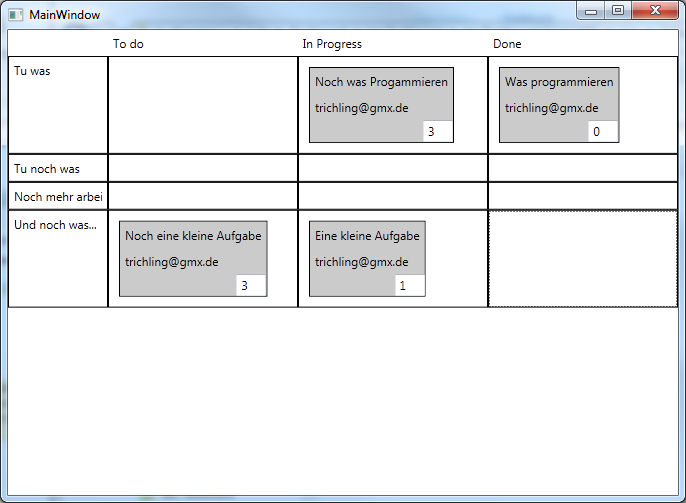
A self made agile taskboard for TFS Express

In the early announcements of TFS Express it was stated that it would contain the agile Taskboard, but not the sprint / backlog planning facilities. But neither in the beta release nor in the RC you could see the taskboard.

According to a tweet from Buck Hodges the taskboard will not be included into TFS Express as a tradoff for being free. While this is sad, because the taskboard was great, I understand that it is needed to cut out some features in the free version - and the features left are still a great deal!

But because the taskboard is great, and because I thought it could not be that hard, I started to write my own. Currently it is a WPF application and not a website, because I am more familar with WPF than ASP.NET MVC. And after a few hours I had my first prototype working!


It is not as nice as the one from Microsoft and it misses some of the features - but it is a starting point. Here is what it can do for you:

  • Configure your TFS / Team Project / Iteration in a config file (no UI for that)
  • Displays BacklogItems as lines and the according tasks in the states "To Do", "In Progress", "Done"
  • You can enter the remaining effort in the textbox in the lower right corner (save on LostFocus)
  • You can drag from "To Do" -> "In Progress",  "In Progress" -> "Done", "To Do" -> "Done" and "Done" -> "To Do" ("Done" -> "In Progress" is forbidden)
  • If you drag to "Done" it sets the effort to 0
Here are the limitations:
  • If you enter wrong TFS Url / Team Project / Iteration the app will crash
  • All operations are synchronous, so you have a delay at start and on every drag 
  • Can not drag from Done to In Progress due to the fact that there must be a rest duration
  • No validation errors are shown if an operation fail
If you want to try it, feel free to download. I have not battle tested this a lot, so it comes without any warranty, as is etc. Use it at your own risk.

If you like it, or you have any suggestions, let me know. By the time I will also release the source code.

Happy Daily Scrum-ing...

Freitag, 29. Juni 2012

A flexible way for validation in Silverlight

There are numerous ways to do validation in Silverlight. Plenty of blog posts have been written about all of them, so I will just provide a list with links and then I will focus on the approach I implemented recently.


Binding property Mechanism Description
ValidatesOnExceptions Exceptions
  • Easy to implement
  • Synchronous
  • Only one error per property at a time.
ValidatesOnDataErrors IDataErrorInfo
  • Must not throw exception in property setter
  • Synchronous
  • Only one error per property at a time
ValidatesOnNotifyDataErrorInfo INotifyOnDataErrorInfo
  • Supports asynchronous validation
  • Can deliver multiple properties at a time
  • Enabled in Binding by default
Data Annotations Attributes
  • Easy to implement
  • Multiple validation rules per property

The INotifyOnDataErrorInfo approach provides the most flexibility. The fact that it is enabled by default saves you a lot of time in case you have a lot of views currently not using any validation rules. But the implementation of the interface seems like a lot of work. So I started thinking about how to make things easy.

How things should work

My idea was to write validation code like this:

    public String Description
    {
      get
      {
        return Get(() => Description);
      }
      set
      {
        Set(() => Description, value);
      }
    }

    public IEnumerable<ValidationError> Validate_Description()
    {
      if (Description.Length < 20)
        yield return new ValidationError("Description is too short.");
    }

The Get() / Set() methods are described in our view model base class. I wanted to use tha same aproach for validation as we use for executing commands through methods prefixed with Execute_.

How to get things to work

The wohle magic happens in the view model base class. This is the one to implement the INotifyOnDateErrorInfo interface:

public abstract class ViewModelBase :  INotifyPropertyChanged, INotifyDataErrorInfo
{
    public event EventHandler<DataErrorsChangedEventArgs> ErrorsChanged;

    public virtual bool HasErrors
    {
      get { return Get(() => HasErrors); }
      set { Set(() => HasErrors, value); }
    }


    public IEnumerable GetErrors(string propertyName)
    {
      
    }

    protected virtual void OnValidationChanged(String PropertyName)
    {
      if (ErrorsChanged != null)
        ErrorsChanged(this, new DataErrorsChangedEventArgs(PropertyName));
    }
}

In the constructor of the class we scan for methods that start with the prefix Validate_ to create validation rules for them. To do so, we define an interface IValidationRule and a class RelayValidator - very similar to the ICommand / RelayCommand implementation:

public interface IValidationRule
{
  IEnumerable<ValidationError> GetValidationErrors(Object Value);
}

public class RelayValdiator : IValidationRule
{
  private Func<object, IEnumerable<ValidationError>> ValidateFunction;
  
  public RelayValdiator(Func<Object, IEnumerable<ValidationError>> Validator)
  {
    this.ValidateFunction = Validator;
  }

  public IEnumerable<ValidationError> GetValidationErrors(Object Value)
  {
    return ValidateFunction(Value);
  }
}

The object parameter passed to the GetValidationErrors method is the property value to be validated. Now we can build up a Dictionary<String, List<IValidationRule>> containing the property name as key and a list of validation rules for the property (as I wanted to be able to have multiple validation rules later).

var ValidateMethodNames = 
  this.GetType().GetMethods()
      .Where(m => m.Name.StartsWith(VALIDATE_PREFIX))
      .Select(m => m.Name.StripLeft(VALIDATE_PREFIX.Length));

var result = ValidateMethodNames
      .ToDictionary(
        name => name, 
        name => new List<IValidationRule>() 
        { 
          new RelayValdiator(x => GetValidationErrors(name, x)) 
        }
      );

The function GetValidationErrors is defined in the base class as well:

private IEnumerable<ValidationError> GetValidationErrors(
                                                   String PropertyName, Object PropertyValue)
  {
    var validateMethodInfo = ViewModel.GetType().GetMethod(VALIDATE_PREFIX + PropertyName);
    if (validateMethodInfo == null)
      return null;

    return (IEnumerable<ValidationError>)
            validateMethodInfo.Invoke(ViewModel, 
            validateMethodInfo.GetParameters().Length == 1 ? new[] { PropertyValue } : null);
    }

The method takes the passed in method name, looks up the method in the class via reflection and invokes it. One little trick is done here anyway: the Validate_Description method as shown above does not take a parameter, as we do not need it in the view model where we can access the value directly. So we see wether we have a parameter and if not, we just do not pass it.

With this in place, we can easily implement the GetErrors method, where m_ValidationRules is the above constructed dictionary.

public IEnumerable GetErrors(string propertyName)
{
  if (propertyName.IsNullOrEmpty())
    return null;

  if (m_ValidateionRules == null)
    return null;

  if (!m_ValidateionRules.ContainsKey(propertyName))
    return null;

  var rules = m_ValidateionRules[propertyName];
  var result = rules.SelectMany(r => r.GetValidationErrors(Get<Object>(propertyName)))
                    .Select(e => new ValidationError(propertyName, e.ErrorMessage));

  // Update HasErrors property

  return result;
}

As mentioned before, the Get<Object>(propertyName) method is part of the view model and delivers the value of a property given its name. It is based on a dictionary as well.

The one thing we missed so far is the HasErrors property. Of course we want it to be set automatically according to the validation errors. So we introduce a list of property names with properties being in an errenous state. Each time we encounter an error we add the name to the list, otherwise we remove it. So if the list contains any element HasErrors must be true, if it is empty it must be false. This is done by the following code, to be inserted in the above listing at the comment:

var propertyHasErrors = result != null && result.Count() > 0;

if (propertyHasErrors)
  if (!m_ErrorProperties.Contains(propertyName))
    m_ErrorProperties.Add(propertyName);
else
  m_ErrorProperties.Remove(propertyName));

HasErrors = m_ErrorProperties.Count != 0;

Further steps

In the first place there is quite some code to write to get things working. But once you have it, you can do some other neat things. For example you can define attributes for validation:

[AttributeUsage(AttributeTargets.Property, AllowMultiple = false, Inherited = true)]
public class IsNotNullValidation : Attribute, IValidationRule
{
  public IEnumerable<ValidationError> GetValidationErrors(object Value)
  {
    var StringValue = Value as String;

    if (StringValue != null && StringValue.IsNullOrEmpty())
    {
      yield return new ValidationError("Der Wert darf nicht leer sein.");
    }

    if (Value == null)
      yield return new ValidationError("Der Wert darf nicht leer sein.");
  }
}

You can stack them on top of your properties. The only thing to do is to not only scan for perfixed methods but for attributes as well and add them to your dictionary.

Happy validating!

Dienstag, 26. Juni 2012

Be careful with (optional) params[]

I just came across an issue with the C# params keyword. It allows you to pass an arbitrary number of arguments to function. Within the funciton the parameters are available as an array which might as well be empty.

The original signature looked like this:
public String GetFormattedMessage(int messageId, params object[] placeholderValues)
{...}

The method looked up the message with the given id in a database. The message might contain placeholder, in which the passed values must be inserted. Because a message can have any number of placeholders, they are passed as params-array (yes, the method handles the case of having to much / to less parameters as well :-))


Calls to the method looked like this:
// The operation {0} succeeded
var msg = GetFormattedMessage(4711, "load customers");
// Customer with first name {0} and last name {1} not found
var msg = GetFormattedMessage(4712, "John", "Smith");
// No service listenting on port {0}
var msg = GetFormattedMessage(4713, 8881);


The new requirement was to be able to hand in a default messagse in case the given message id could not be found, for example due to a missing database update.


So the new signature was:

public String GetFormattedMessage(int messageId, string defaultMessage, params object[] placeholderValues)
{...}

Here comes the problem with the overloaded method: the first two of the above calls immediatly started to call the new overload with the default message. In all cases, and these are the majority, where the first placeholder argument was a string, the second overload is called because the string placholder value is best to fit with the string defaultMessage parameter.

I could not find a nice solution for that. Here were the two options I considered:

  • Introduce a new type for the string defaultMessage parameter like so:
    public String GetFormattedMessage(int messageId, DefaultMessage defaultMessage, params object[] placeholderValues)
  • Do not overload but introduce a new method with a distinct name:
    public String GetFormattedMessageWithDefault(int messageId, string defaultMessage, params object[] placeholderValues)
I have choosen option two because it seemed more explicit to me. I am not happy with that but could not think of another solution - if anyone has thoughts about it, I would be glad to hear. If not, you may keep it in mind to avoid such a situation. At best avoid optinal parameters anyway.

Happy coding!

Freitag, 15. Juni 2012

A better world with a better switch statement

It is known that using switch statements should, in most cases, be replaced by polymorphism when using object oriented languages (refer to Clean Code by Robert Martin, Code Smell G23).

But you must stay pragmatic as well, and sometimes the switch statement is an option. But: why must it's C# syntax look like this? Why is it so inconsistant with the rest of the language? Why do we have to write break?

I imagine a switch-statement like this:

switch (selector)
{
  case (value)
  { ... }

  case (other value || still other value)
  { ... }

  case (new List<>() { a, b, c })
  { ... }

  default 
  { ... }
}

So no ':' that reminds me of lables. No break after each case - use the well known block delimiter instead. Write the argument to the case keyword in braces as like with if, while, for and others. Do not stack control structures but use known logical operators / lists to combine cases.

Would this not be nice?